
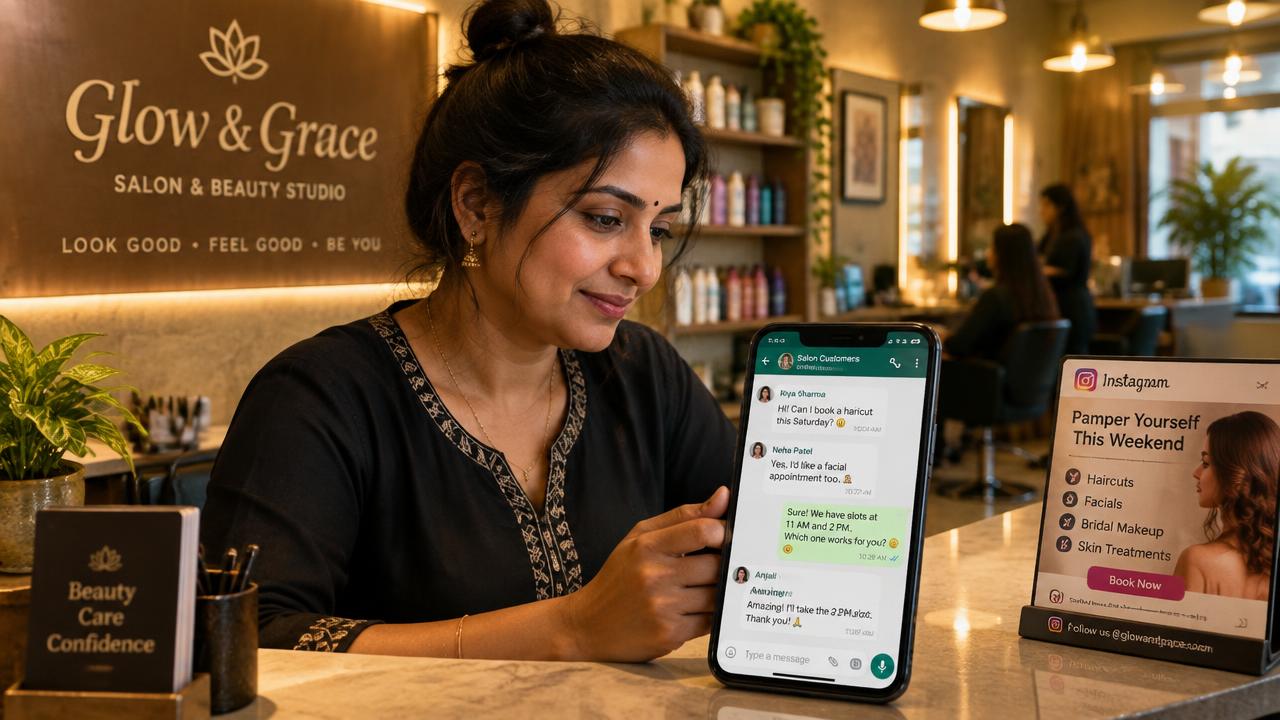
In today's market, connecting directly with your customers is everything. Instead of just getting likes or website clicks, what if you could start a direct conversation with a potential customer right on their phone? This is where WhatsApp ads come in. Many Indian business owners are now asking how to run whatsapp ads on facebook for my business, and for good reason. These ads, shown on Facebook and Instagram, let customers message you on WhatsApp with a single tap. It’s a simple but powerful way to get more leads, answer questions, and close sales faster.
Why WhatsApp Ads Are a Game-Changer for Your Business
Think about it: almost everyone you want to reach is already using WhatsApp every day. Instead of making them fill out a form or visit a website, you meet them where they are most comfortable. This makes a huge difference.
For many Indian businesses, this is the key to growth:
- Direct Customer Connection: You can chat one-on-one, build trust, and understand your customer’s needs personally. This is very valuable for businesses like clinics, coaching centres, and real estate agents who need to build a relationship.
- Faster Lead Generation: For D2C brands or local restaurants, you can quickly share your menu, product catalogue, or special offers. A customer can ask a question and place an order in the same chat.
- Higher Quality Conversations: People who tap on a 'Send WhatsApp Message' ad are genuinely interested. They are not just browsing; they want to talk. This means you get better quality leads compared to other ad types.
Running these ads is a core part of a smart Meta Ads strategy, helping you turn your social media audience into actual business conversations.
A Simple Guide: How to Run WhatsApp Ads on Facebook for My Business
Setting up your first WhatsApp ad campaign on Meta (Facebook and Instagram) is quite straightforward. You don't need to be a technical expert. Here’s a simple breakdown of the steps:
- Connect Your Accounts: First, you need a WhatsApp Business account. It's free and offers helpful tools like catalogues and automated replies. You must link this WhatsApp Business number to your Facebook Page.
- Choose Your Goal in Ads Manager: Go to your Facebook Ads Manager and click 'Create'. You can choose 'Engagement' or 'Leads' as your campaign objective. Both will allow you to direct people to WhatsApp.
- Define Your Audience and Placements: This is where you decide who sees your ad. You can target people based on their location (e.g., your city), interests (e.g., 'fashion' or 'property investment'), and age. You can also choose to show your ads on Facebook Feed, Instagram Stories, Reels, and more.
- Create Your Ad: Now, design your ad. Use a clear image or a simple video. In the ad setup, under 'Destination', choose 'Messaging Apps' and make sure WhatsApp is selected. Your ad will now show a 'Send WhatsApp Message' button.
- Write a Welcome Message: You can also set up an automated welcome message that a user receives after they tap your ad. This can be a simple greeting or a few quick questions to get the conversation started.
Creating Ads That Actually Get Clicks and Chats
Just running an ad is not enough. You need an ad that grabs attention and makes people want to chat with you. Here are some simple tips for better ad creatives:
- Keep it Simple and Clear: Your image or video should instantly tell people what you are offering. A real estate ad could show a picture of the property. A clinic could show a friendly doctor. Avoid cluttered designs.
- Use Video, Especially Reels: Short videos and Reels ads perform very well. A quick video showing your product in action or a tour of your restaurant can be very effective. People feel more connected when they see real people and real places. This is why many brands are now using authentic UGC ads (user-generated content) to build trust.
- Have a Strong Call-to-Action (CTA): Your ad text should tell people exactly what to do. For example: "Tap to get our latest property brochure on WhatsApp" or "Message us on WhatsApp for a free consultation." Give them a clear reason to click.
Smart Strategies to Get the Most from Your WhatsApp Ads
Once you are comfortable with the basics, you can try some smarter tactics to improve your results. One of the most powerful strategies is retargeting. Using the Meta Pixel (a piece of code for your website), you can show your WhatsApp ads to people who have already visited your website or engaged with your past posts. These people are already familiar with your brand and are more likely to start a conversation.
You can also create Lookalike Audiences. Meta can find new people who are similar to your existing best customers, helping you expand your reach to a relevant audience. Combining these audience strategies with a well-managed social media management plan ensures your message reaches the right people at the right time. Don't forget to track your conversations and see which ads are bringing you the most business. This data is key to scaling your campaigns successfully.
Common Mistakes to Avoid
Many businesses make small mistakes that reduce the effectiveness of their WhatsApp ads. Here are a few to watch out for:
- Slow Response Time: When a customer messages you, they expect a quick reply. If you take hours or days to respond, you will likely lose that lead. Have a dedicated person or a system in place to manage incoming chats promptly.
- Not Having a Clear Offer: Why should someone message you? If your ad doesn't offer something of value (a discount, information, a booking), people won't click. Be clear about the benefit.
- Targeting Too Broadly: Showing your ad to everyone in India is not a good strategy. Narrow down your audience to people who are most likely to be interested in your product or service. This saves you money and gets you better leads.
- Forgetting About the Follow-up: The first chat is just the beginning. Have a plan to follow up with leads, provide them with the information they need, and guide them towards a purchase.
Avoiding these common pitfalls can significantly improve your results and help you build a strong pipeline of customers through WhatsApp.
FAQs: How to run whatsapp ads on facebook for my business
Do I really need a WhatsApp Business account for these ads?
Yes, you must have a WhatsApp Business account. The standard WhatsApp Messenger app cannot be used for Facebook and Instagram ads. The Business app is free and gives you access to important tools like catalogues, automated greetings, and quick replies to manage customer chats professionally.
What kind of businesses can benefit from WhatsApp ads?
Almost any business in India can benefit. We've seen great results for D2C brands selling products online, real estate agents generating site visit leads, local clinics booking appointments, coaching institutes enrolling students, and restaurants taking orders. If your business grows by having conversations with customers, WhatsApp ads are for you.
How much does it cost to run WhatsApp ads on Facebook?
The cost is not fixed. It depends entirely on the scope of your campaign—your business goals, the size of your target audience, your industry, and how aggressively you want to advertise. There is no one-size-fits-all price. We invite you to talk to us, and we can prepare a free, customised plan that fits your specific business needs.
People also search for
- how do i create a facebook ad that opens whatsapp?
- how can i link whatsapp business to instagram ads?
- which campaign objective should i choose for whatsapp chats?
- how do i set up a welcome message for whatsapp ads?
- why is the whatsapp button missing in facebook ads manager?
Related topics